
Where developers meet Matera

Build the future of finance with Matera

This is where developers meet Matera. Build on Digital Twin, our flagship real-time ledger; X9.150 QR (open source), the US standard payment QR code; and Matera Workspace — stablecoins, banking and more, extensible and running side by side.

$ docker pull materainc/x9-qrcode:latest
bash — quickstart
$ docker pull materainc/x9-qrcode:latest
✦ AI is welcome

Skip the learning curve.
Let your agent read the docs.

Our software ships with AI Skills, so you don't have to memorize our APIs. Know what you want at 10,000 feet — your agent handles the tedious parts. Point it at AGENTS.md and start playing.

No API spelunking Follows the OpenAPI contract Instant, scannable output
agent session
$ claude
> read AGENTS.md, then issue an X9.150 payment request for a $50.00 invoice. Accept USD + USDC, due Aug 30, with 5% off if paid 10 days early. Render the QR.
Got it — I read the Skills, so I don't need you to spell out the API.
Created the payment request with the early-payment discount and both currencies, then decoded the payload into a scannable QR.
✓ Payment request ACTIVE · QR ready
SCAN WITH YOUR BANK APP
X9.150 payment QR code
$50.00
USD · USDC accepted
Nimbus Cloud Services
Due Aug 30 · 5% early-pay
status: ACTIVE
// WHAT YOU CAN BUILD

Three primitives. Infinite fintech.

Digital Twin

Our flagship proprietary real-time ledger — a consistent, high-throughput source of truth that keeps every balance and transaction in perfect sync. The engine everything else is built on.

How it works →

X9.150 QR

OPEN SOURCE

A complete payment solution for both sides — billers and payers — on the emerging X9.150 US standard. Source-available under a Business Source License: free to run in production for small banks, fintechs and credit unions. Engage, collaborate, and adopt X9.150 fast.

Read the reference →

Matera Workspace

EXTENSIBLE

The commercial platform that unites Digital Twin, X9.150 QR and blockchain integration — running traditional banking and stablecoins side by side, in one place. So your clients transact in stablecoins inside your bank, not somewhere else. Extend it with new products of your own.

Explore the ecosystem →
// TIME TO FIRST CALL: ~60s

No config friction.
Just one Docker image.

Pull the image and point it at your MongoDB replica set — that's it. It's an open, unauthenticated REST API by design (no keys, no login), so your first cURL just works.

Open Getting Started →
$ curl http://localhost:8080/actuator/health
{ "status": "UP" }
// COMMUNITY SHOWCASE

Featured builds from the community

This showcase is waiting for its first masterpiece.

Be the pioneer — ship something on Matera and submit it. Your project could be the first one every developer sees here.

Digital Twin (DTW) is a real-time, 24×7 ledger — the always-on foundation of a bank's real-time estate. Digital channels, card processors, blockchain and the instant rails (FedNow, RTP) connect to it because they can't stop, while slower batch systems (mainframe DDA, general ledger, reporting) take their maintenance windows without ever interrupting a payment.

Two value propositions

Use either — or both, side by side:

Fiat, made real-time / 24×7

DTW shadows a core-banking DDA, so balances and posting stay always-on even when the core is in batch. Replication is asynchronous, so a mainframe window never stops a payment or a card authorization.

Crypto / stablecoins, natively

DTW holds crypto balances (USDC, USDT, BTC, ETH…) natively, in the same banking UX and with no DDA behind them. Custody stays with providers like Circle, Fireblocks or Utila — DTW holds no keys.

What it models

  • Multi-asset — one account per asset/currency (fiat, crypto, loyalty points, fund shares, security quantities…), never mixed in a single account.
  • Multi-balance — many balances within an account (available, held/blocked, frozen); a transaction (history) code decides which balances an entry affects, and in which direction.
  • Append-only ledger — a balance is the deterministic sum of the journal. Confirmations and reversals are new entries; history is never rewritten.

How you integrate

DTW is dual-interface — trigger a transaction synchronously over REST or asynchronously over Kafka (Avro), and read balances and statements over REST. It exposes APIs to systems — channels, card/payment processors, adapters — secured with mTLS + OAuth2 and per-domain scopes, never to end users.

// FULL REFERENCE & AI TRAINING

Go deeper at digitaltwin.materalabs.us

This page is a summary. The complete, source-linked Digital Twin documentation — architecture, ledger model, rule engine, and full REST & Kafka specs — lives on the dedicated portal.

It also publishes llms.txt and llms-full.txt — point your AI assistant straight at them to have it read the docs — plus machine-readable rest.json / avro.json API specs.

Prerequisites

  • Docker 24+ (the only hard requirement to get started)
  • An HTTP client — cURL, Postman, or your language SDK
  • ~2 GB free memory for the API and MongoDB replica set

1. Pull & run

The image is the application only — it needs a MongoDB replica set (for multi-document transactions). Pull it, then point the container at your MongoDB. No keys, no login — access control is the deployer's job (gateway, mTLS, or network policy).

terminal
$ docker pull materainc/x9-qrcode:latest

$ docker run -p 8080:8080 \
    -e SPRING_DATA_MONGODB_HOST=your-mongo-host \
    -e SPRING_DATA_MONGODB_PORT=27017 \
    -e SPRING_DATA_MONGODB_REPLICA_SET_NAME=your-rs \
    materainc/x9-qrcode:latest

2. Your first call — create a payment request

Post a payment request; the API returns an id, the EMV QR string and a signed location URL. Pick your language below.


Response (201 Created):

{ "id": "019F7C218527E9833CDD9AA6733C745F", "qrCode": "00020101021226800006org.x9...6304ABCD", "location": { "id": "019F7C218527E9833CDD9AA6733C745F", "endpoint": "https://<host>/pub/api/v1/loc/019F7C21..." }, "status": "ACTIVE" }

The X9.150 standard

X9.150 is the emerging US standard for interoperable payment QR codes. Matera's solution serves both sides of the transaction — billers and payers — producing spec-compliant, TLV-encoded payloads that any conformant wallet can parse, for both fiat rails and stablecoin settlement. It's source-available under a Business Source License, free to run in production for small banks, fintechs and credit unions.

The QR is a reference, not the data

The scannable EMV string carries only a location URL plus merchant basics — never the amount or payment networks. Those live in a JWS-signed payload fetched from POST /pub/api/v1/loc/{id}, designed to be read by an authenticated payment app, not a phone camera.

Endpoints

POST /api/v1/payment-request Create a payment request
GET /api/v1/payment-request/{id} Retrieve a request
PUT /api/v1/payment-request/{id}/status-update Change status
POST /pub/api/v1/loc/{id} Fetch signed JWS payload (payer PSP)

Request body

FIELDTYPEDESCRIPTION
validUntilstringExpiry timestamp for the request (ISO 8601).
creditorobjectMerchant details: name, MCC, address, contact.
billobjectdescription, amountDue { amount, currency }, optional tip.
paymentMethodsarrayOne or more currency + network offers (bank rails or wallet).
paymentNotificationobjectOptional notification config, e.g. { "kind": "DEFAULT" }.

Amounts are 64-bit integers in the currency's minor units (USD cents, USDC 6-decimals) — never floats. "amount": 2450 means $24.50. Currency is an open string: an ISO 4217 code or a crypto ticker.

Powered by Digital Twin

Every Workspace deployment runs on Digital Twin, our real-time ledger — a consistent, high-throughput source of truth for balances, transfers and stablecoin settlement.

Built-in components

Workspace ships with production-ready modules so you don't rebuild the plumbing. Enable what you need; ignore the rest.

Digital Twin

The real-time ledger at the heart of every deployment — consistent balances and settlement.

Stablecoins

Major blockchains, plus custody and infrastructure via Circle, Fireblocks or Utila.

Legacy core-banking integration

Convert USD controlled by your legacy core banking into USDC controlled by Digital Twin — or vice versa — as a single ACID distributed transaction.

Agentic BPM

Onboarding, stablecoin treasury management and more. Design your process in plain English, with AI running inside each step — AI2.

Content Renderer

Contract and T&C templates, versioned and rendered from placeholders — producing PDFs with your brand and the exact content your compliance approved.

Security

Google and Microsoft login, passkeys for 2FA and digitally-signed transactions, and post-quantum cryptography.

And more — all available to your own apps, too.

Extensibility

Build on the platform

Workspace is commercial, but it's not a walled garden. Register your own cards in the Workspace registry to add products, operations and reports — including external tools that open in their own tab.

Your extension, your license

Extensions you build on Workspace are yours to license however you like — open source, freemium, or a traditional commercial license. The core X9.150 QR generator stays open source.

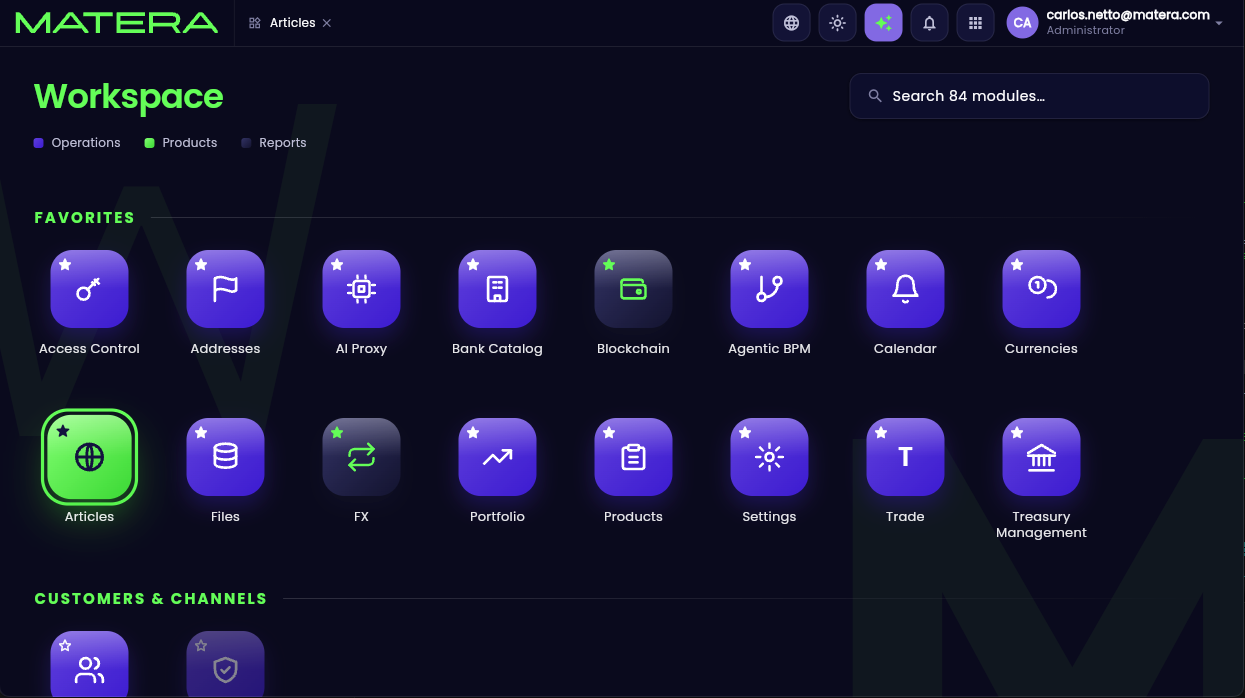
Register a module

This is the tile on the Launchpad.
workspace-registry.json
{
"code": "demo-mysite",
"kind": "APP",
"parent": null, // null = a top-level card (not nested in a lane)
"order": 1,
"category": "product", // green gradient tile
"live": true,
"icon": "globe", // → launcher-icons/globe.svg
"i18n": { "en-US": "Articles", "pt-BR": "Artigos" }
}
That single object adds the Articles tile to the Launchpad — no UI code, no redeploy.
Matera Workspace — Launchpad
Matera Workspace Launchpad showing the newly registered Articles app tile

Add a screen to the menu

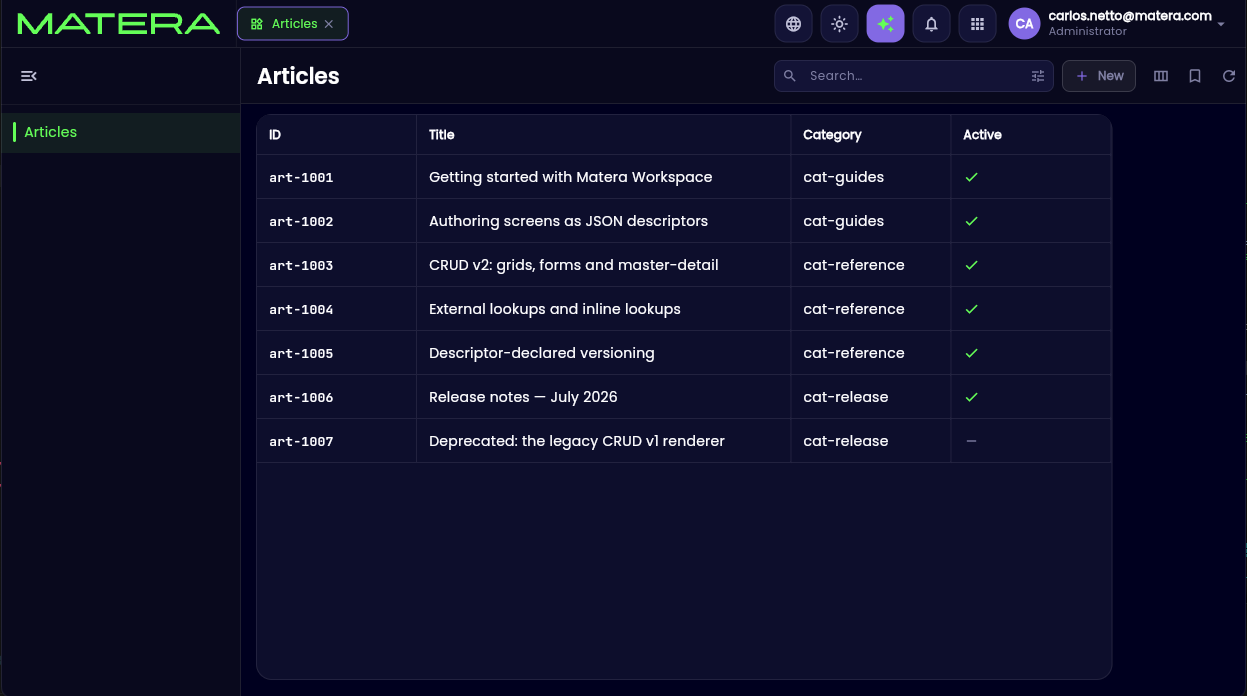
Beyond external cards, you can add full screens to Workspace — grids, forms, CRUDs — with no UI code. Hand the Workspace UI manager a JSON descriptor and it renders the screen, wires the data source, and even resolves external lookups for you.
screens/mysite-article.json
{
"name": "mysite-article", // = <service>-<resource>, matches the file basename
"kind": "simple_crud",
"view": "grid",
"title": { "en-US": "Articles", "pt-BR": "Artigos" },
"readOnly": false,
"permissions": { "insert": true, "update": true, "delete": true },
"dataSource": {
"rowsApi": "/api/query/mysite/article",
"defaultSort": [ { "column": "title", "dir": "asc" } ]
},
"resource": "article",
"pk": ["id"],
 
"columns": [
{
"name": "id",
"label": { "en-US": "ID", "pt-BR": "ID" },
"type": "string",
"pk": true,
"searchable": true,
"sortable": true
},
{
"name": "title",
"label": { "en-US": "Title", "pt-BR": "Título" },
"type": "string",
"searchable": true,
"sortable": true,
"validation": { "required": true, "maxLength": 200 }
},
 
// ── external lookup: store category_id, show the category name ──
{
"name": "category_id",
"label": { "en-US": "Category", "pt-BR": "Categoria" },
"type": "reference",
"searchable": true,
"sortable": true,
"ref": {
"api": "/api/query/mysite/category", // the OTHER resource (a registered read)
"from": ["category_id"], // LOCAL column holding the FK
"on": ["id"], // key column on the TARGET to match
"label": "name", // target column to display
"batch": true // resolve all on-screen values in one GET
}
},
{
"name": "is_active",
"label": { "en-US": "Active", "pt-BR": "Ativo" },
"type": "boolean",
"display": "check",
"sortable": true
}
]
}
The same descriptor renders this full CRUD grid — searchable, sortable, with the category name resolved through an external lookup.
Matera Workspace — Articles
The Articles CRUD grid screen rendered by the JSON descriptor

Deploy anywhere

Docker / Compose
Kubernetes
Your own cloud
// OPEN SOURCE

Better, together.

Our X9.150 solution is source-available under a Business Source License — free to run in production for small banks, fintechs and credit unions. Engage, collaborate, and adopt X9.150 fast. And while Matera Workspace and Digital Twin are commercial, we welcome the community to build extensions on top of them and ship them as open source, freemium, or under a traditional license. Your call.

Star on GitHub Read the docs
// CONTRIBUTION PIPELINE

Three steps to your first PR

01

Fork the repo

Grab your own copy of the X9.150 repository on GitHub and clone it locally.

git clone \ git@github.com:matera-inc/x9.150-qrcode.git
02

Branch & build

Spin up a feature branch, make your change and run the test suite.

git checkout -b feat/my-change docker compose up
03

Open a PR

Push and open a pull request against matera-inc/x9.150-qrcode. A maintainer reviews it and merges.

git push origin \ feat/my-change
// COMMUNITY SHOWCASE

Be the first to be featured

projects_featured.length === 0

This showcase is waiting for its first masterpiece.

Open a PR with your project in /showcase and it lands right here — with your name on it.

Submit your project →